
License Activation And Deactivation
How to Activate Your Pewbeam License
1. First-Time Download?
If you're downloading Pewbeam for the first time, follow these steps
- Download Pewbeam here - pewbeam.com/download
- Open Pewbeam and click Enter a License Key to activate.
- Enter your License Key exactly as provided in your email, including all hyphens, then click Activate.

2. Already Logged In?
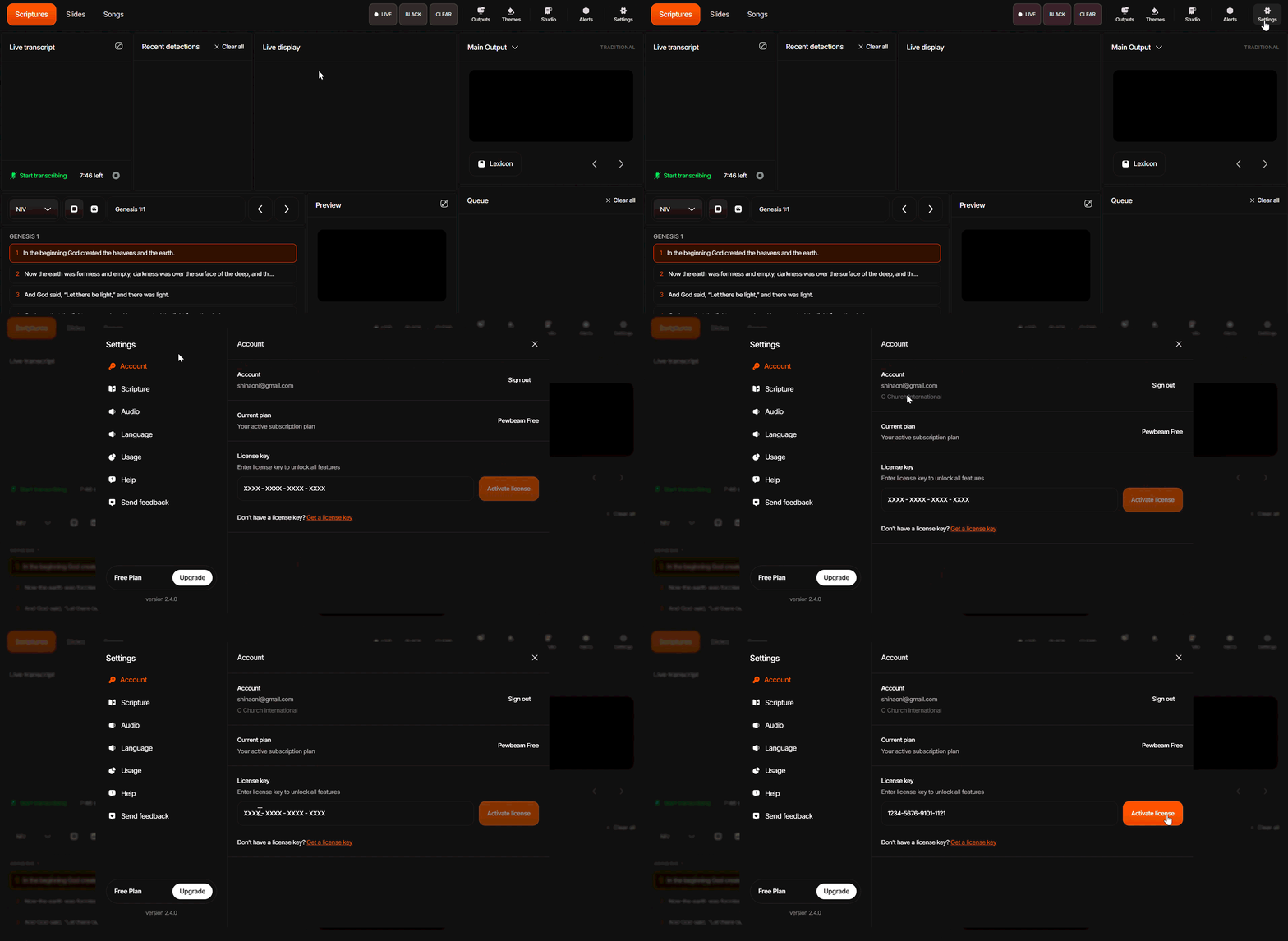
Here is another way you can activate your Pewbeam license:
- Go to your Settings by clicking the Gear icon in the top navigation bar.
- Click Account.
- Select License and enter your License Key.
- Click Activate.
How to Deactivate Your Pewbeam License
If you need to move your license to another device, you must deactivate it on your current device first.
- On the device where Pewbeam is currently active, open Pewbeam and go to Settings > Account.
- Click Deactivate device.
- Your license is now free to be activated on another device. Follow the activation steps above on your new device.
Note: This applies to Plus users only, as Plus allows activation on one device at a time.
