
Staging, Queue and Live Output Controls

Preview Panel
Staging area that shows exactly how a selected verse will look on screen with your current theme applied, before it reaches your audience. Verses can be sent to Preview from AI Detections, Scripture Search, or the Queue.
Queue Panel
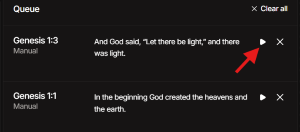
Holds prepared verses from AI Detections or Scripture Search, ready to display during the service. Click the Play icon to display a verse immediately, X to remove it, or Clear All to reset the queue. The currently live verse is highlighted.
Go Live Toggle (Key: L)
Controls the connection between Preview and your live broadcast output. When Go Live is ON, any verse sent to Preview immediately goes to broadcast.
When Go Live is OFF, you can stage and review verses in Preview without changing what your audience sees. Turn Go Live ON when you are ready to push the current preview to broadcast.